
As part of the Syndeia 3.7.2 release, Intercax has introduced the Syndeia MCP Server 1.0.0. MCP (Model Context Protocol) is an open standard that lets AI applications connect to external tools, data sources and systems through a single, consistent protocol instead of a custom integration for every pairing of model and system. Engineers can ask questions in plain language from MCP clients such as Claude Desktop and VS Code. The client then uses Syndeia MCP tools to retrieve digital thread projects, cross-repository relations, baselines, pipelines, and data from connected engineering repositories.
Intercax has been demonstrating custom AI agents with Syndeia since 2025. Syndeia provides both the knowledge graph of the system data and a single API to all that data that enables AI to efficiently extract system knowledge from large data sets. The MCP server provides an alternative approach to AI adoption by allowing any host application to access the Syndeia digital thread and the underlying data repositories without custom code. Syndeia users can bring their own choice of LLM to their integrated design environment, not dependent on any AI components incorporated by software vendors.
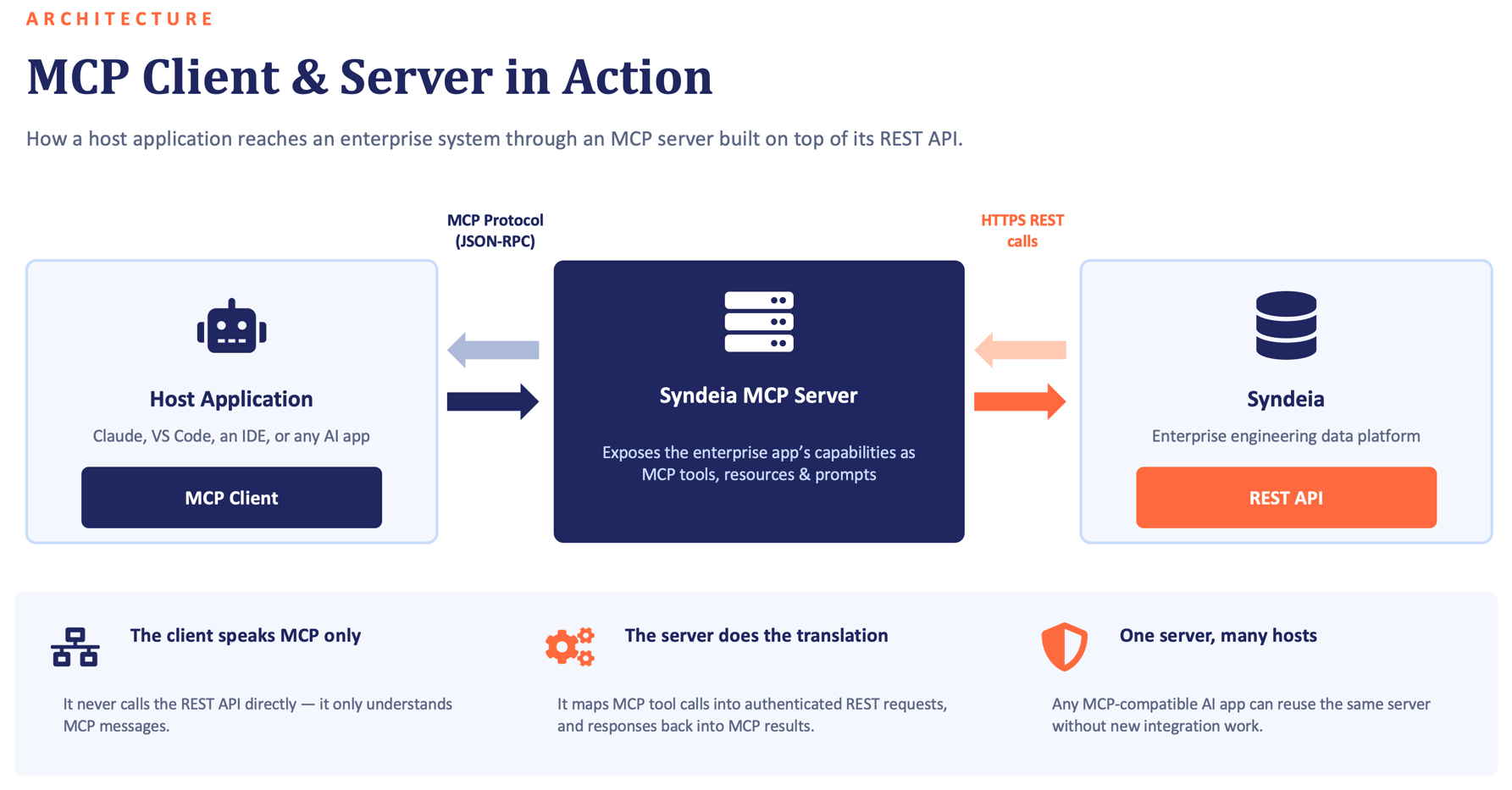
Figure 1 : Talking to your Data via the Syndeia MCP Server - Digital Thread Project Prompts
Key features of the Syndeia MCP Server 1.0.0:
- 87 MCP tools in 13 groups: core tools for connection, digital thread, and pipelines, plus tools for 10 repository types: Aras Innovator, Codebeamer, DOORS NG, Jama, Jira, Polarion, SysML v2, Teamcenter, Teamwork Cloud, and Windchill.
- Prompting Guide with 80+ example prompts covering every tool group, including multi-step follow-up workflows and formatted outputs such as tables, hierarchy trees, and hyperlinked results.
- Per-user authentication: each user’s Syndeia Cloud and repository credentials stay on that user’s machine and are sent only with requests. The server stores no credentials, and results reflect what each user’s accounts can access. A service account mode is available for single-user and dev/test deployments.
- Simple, secure deployment: the server runs as a single Docker container alongside Syndeia Cloud, with HTTPS support and a health endpoint for verification. Admins can enable only the repository types their organization uses to keep the tool list focused.
- Works with standard MCP clients: includes step-by-step setup guides for Claude Desktop and VS Code, and also works with other MCP clients. Built-in prompt templates appear in supported clients.
Querying your Data in Natural Language
From an MCP client, the user can query Syndeia on both the digital thread level and the underlying repositories. In the example below, we have first entered the query,"Syndeia, find me inter-model relations for Teamcenter item 008465 in the AV01 digital thread project", asking how a particular part is connected in a particular system/digital thread project. In Figure 2, we ask for the same information for that part's BOM and specify the output format, without having to repeat part or project name.
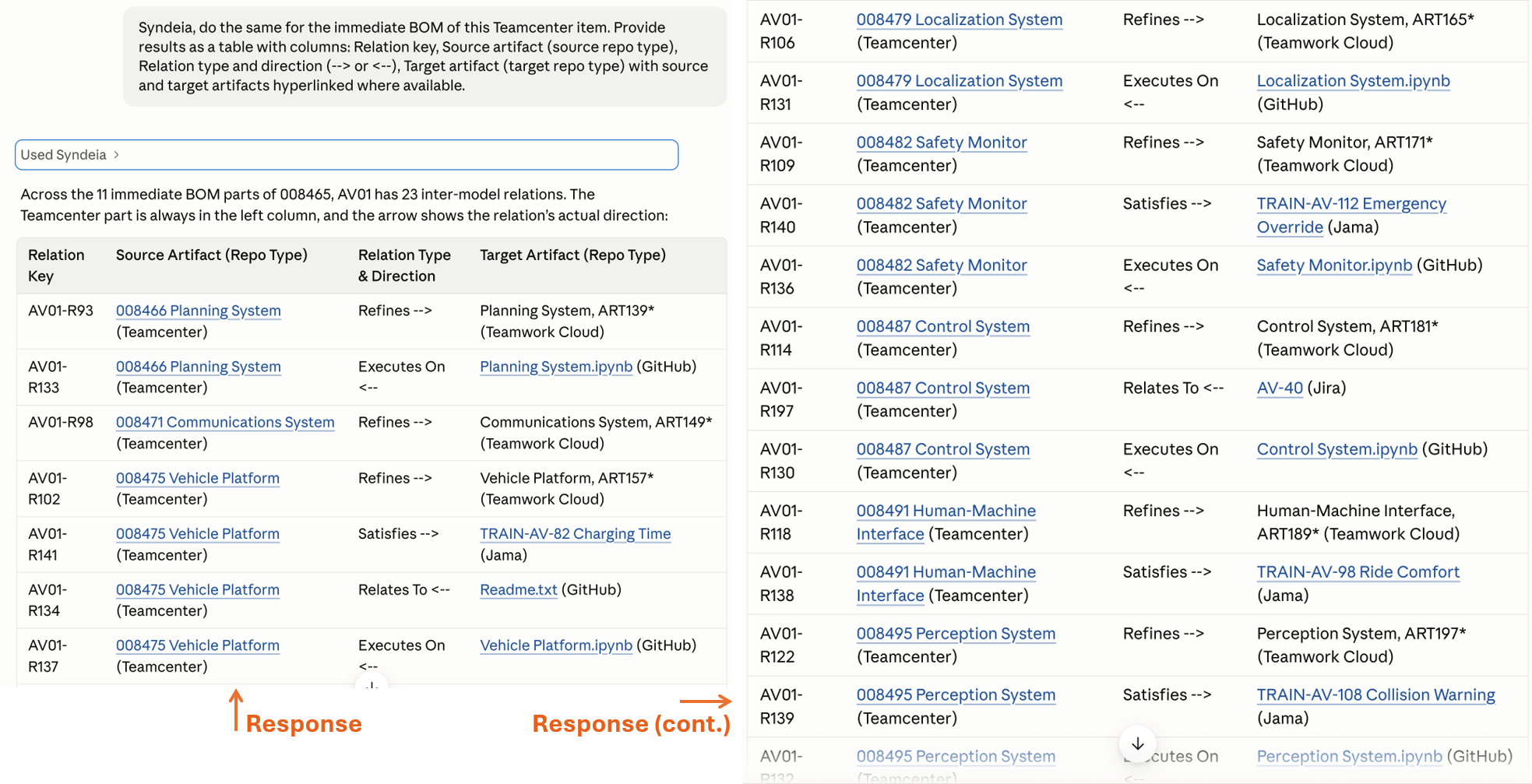
Figure 2 : Syndeia MCP Example 1 - Querying digital thread for Autonomous Vehicle starting with the BOM in Teamcenter
Combining Syndeia MCP with Digital Pipelines
Digital pipelines automate routine tasks such as updating repository information or creating reports. Syndeia can manage pipelines created in Apache Airflow and the Syndeia MCP lets the MCP client query pipeline execution history or even trigger pipelines.
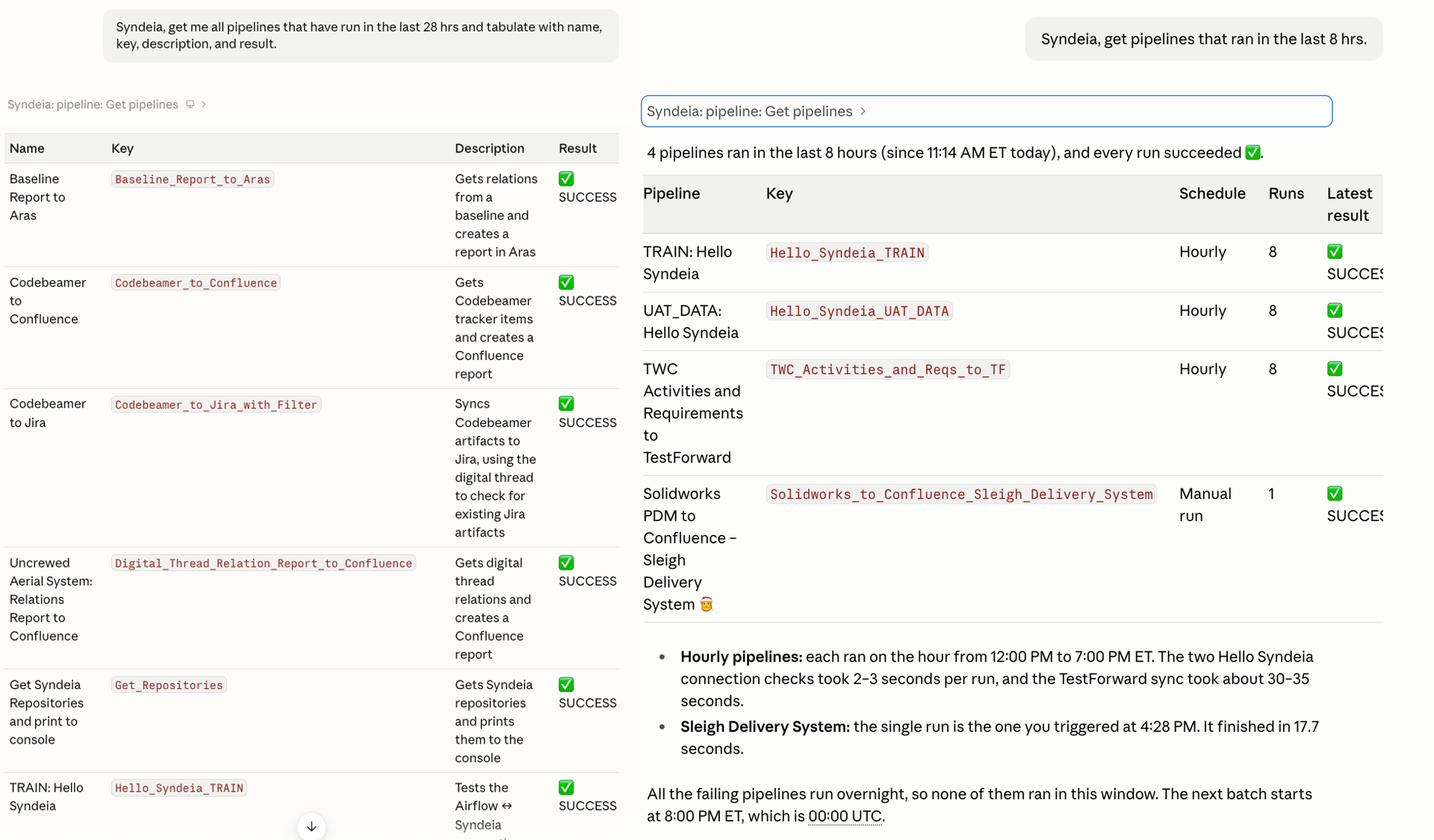
Figure 3 Syndeia MCP Example 2 - Fetching pipeline histories
MCP User Guides
The Syndeia MCP Server 1.0.0 comes with extensive on-line resources to help users come up to speed quickly on deployment and usage, including prompting, authentication and tool reference guides.
Syndeia is a robust digital thread platform meeting and resolving challenges in a wide range of real-world deployments and undergoing constant improvements, which we share with our subscribers in these releases. Questions and suggestions for the next release, Syndeia 2027, are welcome on our on-line helpdesk at www.intercax.com/help.