
Intercax is excited to announce the October 28, 2026 release of Syndeia 3.7.2. This release incorporates ongoing improvements driven by real-world customer requirements, along with expanded documentation, bug fixes, and integration updates. It also marks the first release of the Syndeia MCP Server.
You can find the complete list of improvements here. Below, we’ll highlight a few of the most notable updates and explore them in greater depth in subsequent blog posts.
Syndeia MCP Server 1.0.0
Syndeia 3.7.2 introduces the Syndeia MCP Server 1.0.0, which brings Syndeia Cloud to AI assistants through the open Model Context Protocol (MCP). Engineers can ask questions in plain language from MCP clients such as Claude Desktop and VS Code. The client then uses Syndeia MCP tools to retrieve digital thread projects, cross-repository relations, baselines, pipelines, and data from connected engineering repositories.
Key features:
- 87 MCP tools in 13 groups: core tools for connection, digital thread, and pipelines, plus tools for 10 repository types: Aras Innovator, Codebeamer, DOORS NG, Jama, Jira, Polarion, SysML v2, Teamcenter, Teamwork Cloud, and Windchill.
- Prompting Guide with 80+ example prompts covering every tool group, including multi-step follow-up workflows and formatted outputs such as tables, hierarchy trees, and hyperlinked results.
- Per-user authentication: each user’s Syndeia Cloud and repository credentials stay on that user’s machine and are sent only with requests. The server stores no credentials, and results reflect what each user’s accounts can access. A service account mode is available for single-user and dev/test deployments.
- Simple, secure deployment: the server runs as a single Docker container alongside Syndeia Cloud, with HTTPS support and a health endpoint for verification. Admins can enable only the repository types their organization uses to keep the tool list focused.
- Works with standard MCP clients: includes step-by-step setup guides for Claude Desktop and VS Code, and also works with other MCP clients. Built-in prompt templates appear in supported clients.
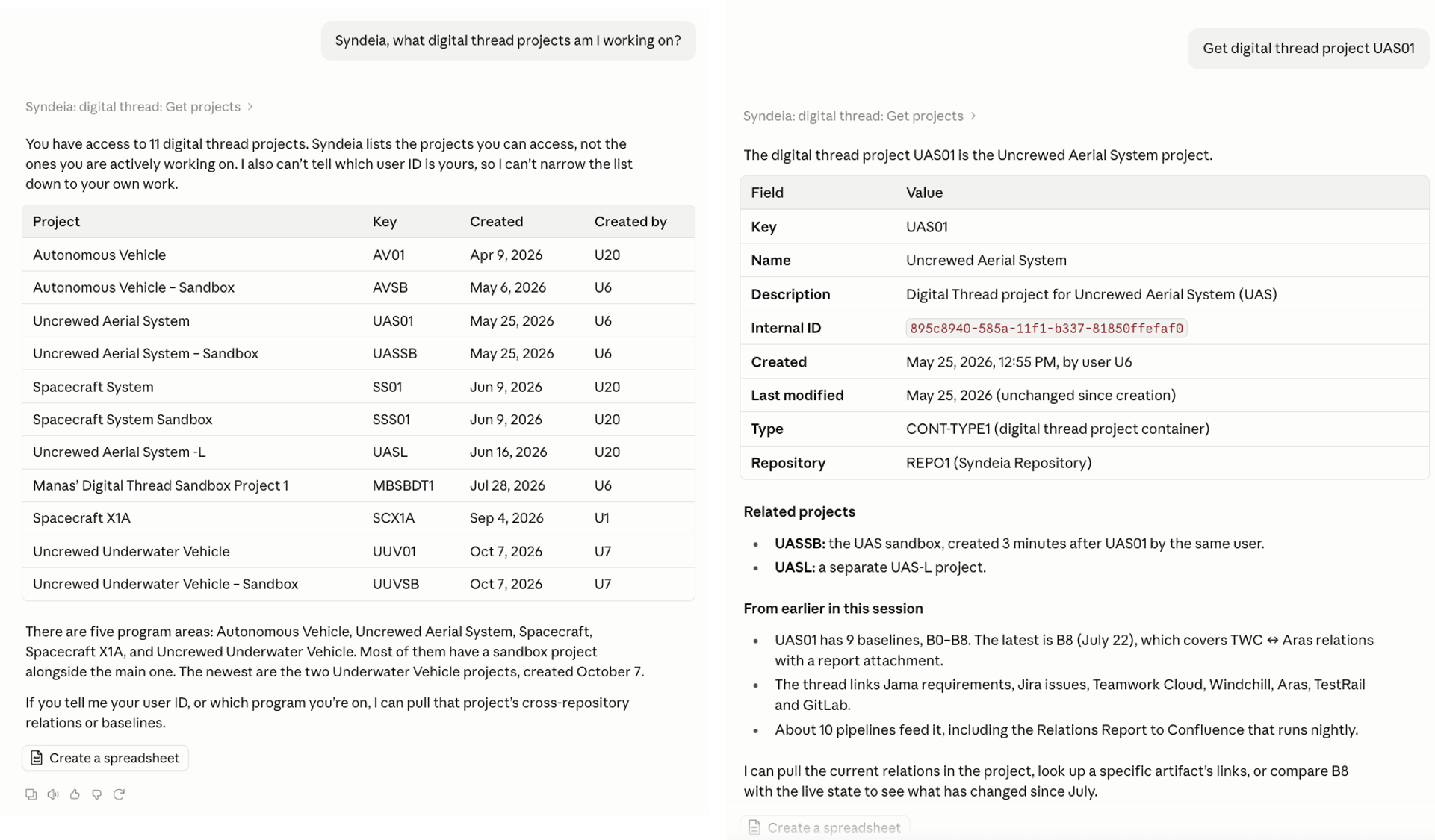
Figure 1 : Talking to your Data via the Syndeia MCP Server - Digital Thread Project Prompts
Figure 1 shows examples of natural language queries, using Claude Desktop as an MCP Client, generating a list of Syndeia digital thread projects and details about a specific project. The Syndeia MCP Server not only supports commands at the Syndeia digital thread level (projects, relations, baselines and pipelines), but also ten underlying repository types including SysML v2. Look out for our next blog post showing more examples of prompts using the Syndeia MCP Server.
Artifact Type-Specific Color Coding
Syndeia 3.7.2 lets users assign custom colors to artifact types in each repository, and those colors appear in the Digital Thread Explorer (DTE). Previously, all artifacts from a repository were shown in a single color. Now, users can tell at a glance whether a node is a Jira task, bug, or story; a Teamcenter item, part, or requirement revision; or if a SysML element is a block, activity, or requirement, even in large graphs that span many repositories.
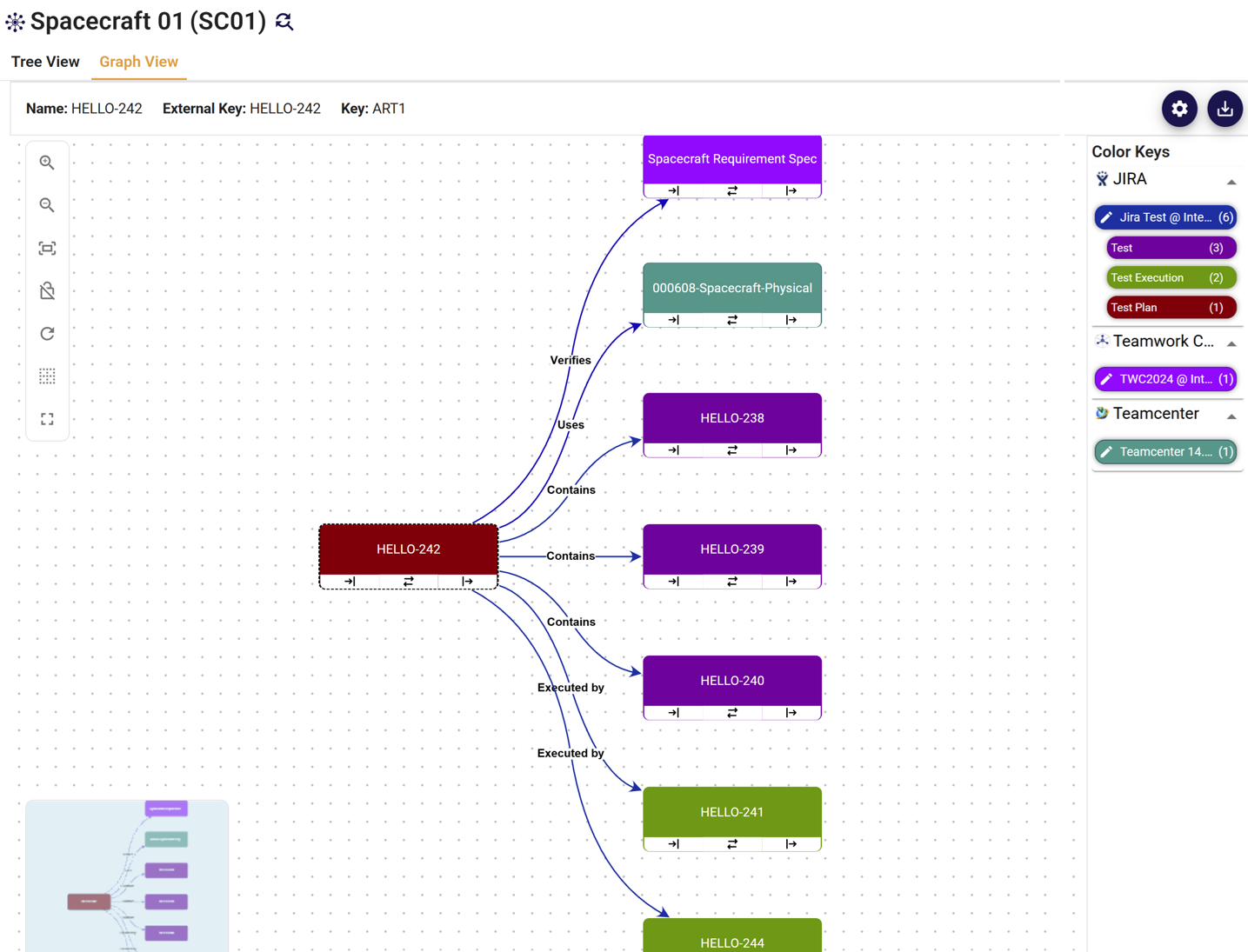
Figure 2 : Digital Thread Explorer graph showing custom color coding for 3 different JIRA Test artifact types
Blog post 3 in this series will show more examples of how this feature can improve the readability of digital thread graphs, including Teamwork Cloud SysML models, and how it accommodates custom artifact types.
New and Improved Integrations
Syndeia 3.7.2 includes two major new integrations, Onshape and Xray, and significant improvements to several of the existing integrations: Codebeamer, Aras, Jama, Teamwork Cloud, Windchill, Volta and SysML v2. You can find a complete list of improvements here.
A new integration with Onshape, PTC’s cloud-native CAD and PDM platform, enables engineering teams to bring Onshape design data into the digital thread alongside their requirements, PLM, ALM, and software artifacts (Figure 3). Xray is a test management app built natively inside Jira whose verification and validation data can now be linked into the digital thread.
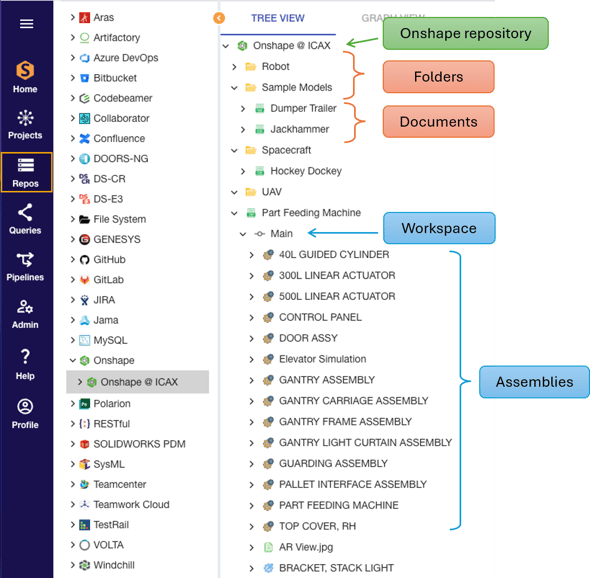
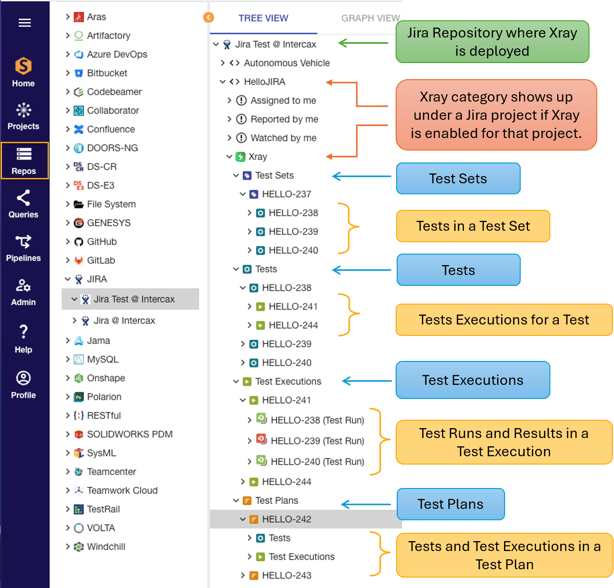
Figure 3 Syndeia Web Browser view of Onshape repository Figure 4 Syndeia Web Browser view of Xray (JIRA) repository
Syndeia 3.7.2 adds support for Streams and Baselines in Codebeamer (3.2 or later). Users can now view requirements and other tracker items as they exist in a specific Stream or Baseline, not just in the current working version.
The full integration compatibility matrix is available at here.
API Updates
As our technology partners release new versions of their engineering software tools, Intercax updates our API connections to those tools to keep our users current. 3.7.2 incorporates changes in the API for Artifactory as well as fixes for issues with pagination, baselines and OAuth2 authentication.
Cookbooks
To enable Syndeia users to exploit the possibilities of the digital thread more easily, Intercax supplies sample code in the form of “cookbooks” of Jupyter notebooks and Airflow digital pipelines. 3.7.2 comes with 32 notebooks and 32 pipelines, with new ones involving Onshape, Xray, Aras, DOORS NG, JIRA, SysML v2 and other widely-used tools.
Deployment
Ansible playbook and containerized deployment features were introduced in Syndeia 3.7. The new release includes instructions for upgrading those deployments from 3.7.1 to 3.7.2.
Syndeia is a robust digital thread platform meeting and resolving challenges in a wide range of real-world deployments and undergoing constant improvements, which we share with our subscribers in these releases. Questions and suggestions for the next release, Syndeia 2026, are welcome on our on-line helpdesk at www.intercax.com/help.