
Our objective at this stage is to complete the interconnection of urban system blocks in SysML and then to transform that SysML model to an equivalent model in a simulation tool, here Simulink (The MathWorks). The initial step in SysML is to create internal block diagrams (IBDs) showing the parts and their ports and to draw connectors between them.  When the SysML model is complex, multiple diagrams are created to limit the number of parts and connectors per diagram to improve interpretability. Since each diagram is a selective view of the same SysML model, models of any complexity can be built by adding additional diagrams. Our complete SysML model, available for download with this publication, includes sixteen separate IBDs.
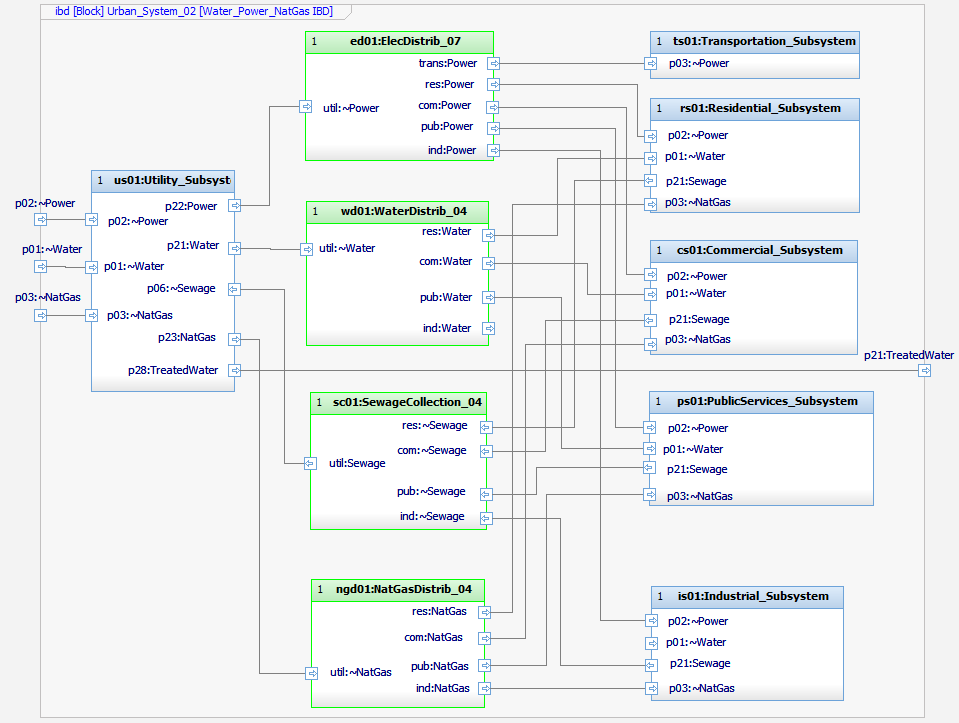

Figure 1 Internal Block Diagram, Water/Power/Gas distribution between major subsystems (Rhapsody)

Figure 1 is an example of an IBD from the top-level Urban_System_02 block. It is intended to show the flows of power, water, sewage and natural gas from the Utility Subsystem to the other major subsystems (flows to DataComm and SmartCity subsystems are shown on additional diagrams). Figure 2 shows another IBD from the same level with the flows of labor from the Residential Subsystem to the other subsystems. Additional diagrams show flows of transportation, goods, trash and communications. One feature of this model is highlighted by the color coding in these IBDs. The blue parts represent the subsystems/services; the green parts are “distribution blocks” representing the allocation of flows between multiple services or the aggregation of flows from multiple services. The use of these distribution blocks is pragmatic. Although SysML allows multiple connectors from one port, this can be a problem during model transform to other tools such as Simulink which do not permit it.
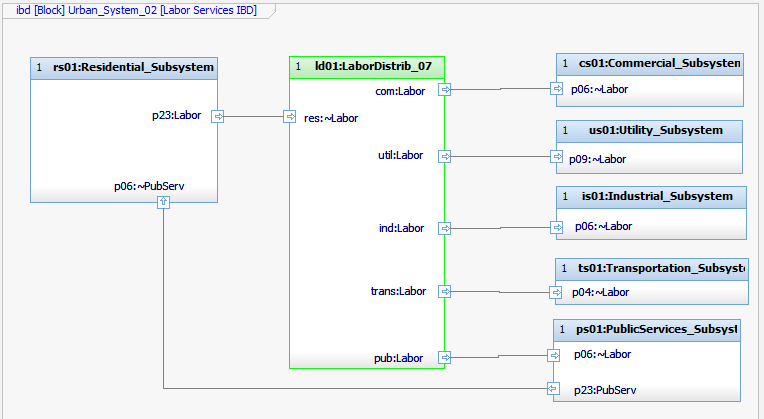

Figure 2 Internal Block Diagram, Labor distribution between major subsystems (Rhapsody)

Other IBDs are used to model flows inside the major subsystems. Figure 3 shows the flows of labor/goods/trucks within the Industrial Subsystem. The ports on the diagram boundary represent inputs/outputs of the Industrial Subsystem itself and correspond to ports on parts of that type in higher level diagrams.
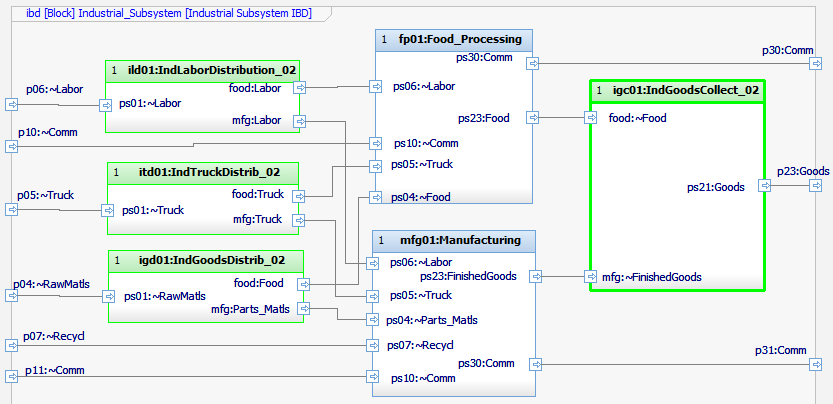

Figure 3 Internal Block Diagram, Labor/Trucking/Goods distribution between industrial subsystems (Rhapsody)

Generally, architecture modeling and simulation will be done in different tools, each specialized for the purpose. The challenge arises that these models may be inconsistent, especially as time passes and the models evolve independently. One solution uses Syndeia to transform all or part of the SysML model into a model of similar structure in another tool. Figure 4 shows how the model for the Industrial Subsystem has been transformed into Simulink.
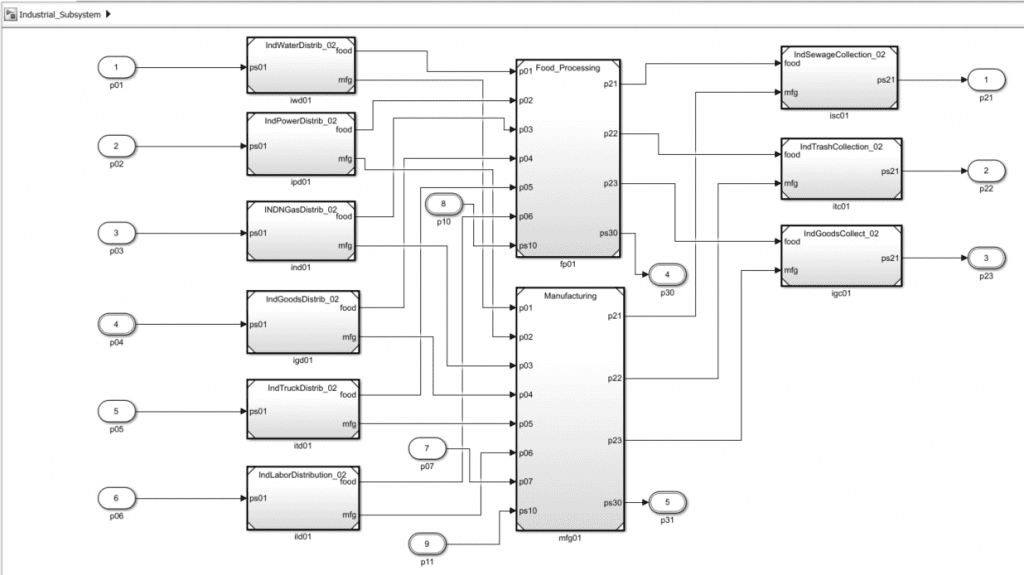

Figure 4 Simulink model transform of Industrial Subsystem connections

Each Simulink block in Figure 4 is connected to the original SysML block and duplicates its ports and connectors. Syndeia can compare and update the models in either direction as one or both change. Note that the Simulink model created is only the first step in building an executable simulation; typically, a Simulink analyst will add the simulation code to the blocks for the desired analysis. Syndeia maintains traceability between the models as part of the Total System model.

In the next post, we add connections from our federated models to a JIRA (Atlassian) issue tracking repository for project management purposes. In this and other posts in the series, we provide alternative versions for SysML modeling in Cameo. Both SysML models will be made available for download with the final installment of the series.

Related Posts:

Tags:
Blog

Related Posts

Pipelines Part 3 – Matching Requirements to Parts using Syndeia Digital Pipelines

We’re continuing our blog series on using Syndeia digital pipelines to execute real world use cases in systems engineering. In Part 2, we demonstrated a digital pipeline that ...
Dirk Zwemer and Gregory Seeds

Pipelines Part 2 – Gap Analysis between Requirements and Tests

Demonstrating measurable ROI from digital engineering is just as important in driving enterprise adoption as customer mandates, e.g. DoDI 5000.97. In particular, the concept of ...
Dirk Zwemer and Gregory Seeds

Pipelines Part 1: Quick Introduction and Demo

Syndeia Pipelines automate digital engineering workflows by orchestrating complex, multi-step tasks, such as ETL operations, cross-repository queries, model transformations/syncs, ...
Manas Bajaj

Christmas at the North Pole, Powered by Pipelines🎄

While the rest of the world is busy hanging lights, doing last minute gift shopping, and sipping cocoa, the North Pole is deep in digital engineering mode. Snow is falling, elves ...
Manas Bajaj

What’s New in Syndeia 3.7? - Part 1

We are excited to release Syndeia 3.7, the next generation of our digital thread platform for integrated digital engineering. Check out the latest features in less than 5 minutes ...
Dirk Zwemer

Model-Based Systems Engineering for Autonomous Vehicles, Part 16 – Custom Dashboards

In Parts 1-10 of this blog series, we built a digital thread for an autonomous vehicle system to demonstrate how a federation of models in different software tools can become a ...
Dirk Zwemer

Model-Based Systems Engineering for Autonomous Vehicles, Part 15 – Digital Pipelines

In Part 14 of this series, we developed a custom script to calculate project metrics for our Autonomous Vehicle digital thread project. The value of this information is greatest ...
Dirk Zwemer

Model-Based Systems Engineering for Autonomous Vehicles, Part 14 – Open REST API

Syndeia has been developed as an API-first enterprise application, i.e. the full capabilities of the software are exposed through an open REST API with the understanding that the ...
Dirk Zwemer

Model-Based Systems Engineering for Autonomous Vehicles, Part 13 – Digital Reports

A key function of Digital Threads is to be able to answer questions about project status in real-time without the overhead of data collection, status reports and meetings. In this ...
Dirk Zwemer